Rewrite your clipboard with one keystroke.
cmdFlow runs your prompt on whatever you copied — translate, fix, summarize — with Apple's on-device AI, and the result lands back in your clipboard. Or snap a screenshot and chat with a vision model about it. Private by default. Free and open source.
macOS 26 · Apple Silicon · MIT licensed
"je suis en retard"
I'm running late.
How it works
Three keystrokes, start to finish
No window to open, no context to switch. It happens right where you are.
Copy anything
Select text, ⌘C. A snippet, an email, a comment block.
Press your shortcut
Each action has its own global hotkey. cmdFlow reads the clipboard and runs your prompt.
Paste the result
The AI's output replaces your clipboard. ⌘V, done.
Features
Everything, one keystroke away
Built for developers and power users who live in their keyboard.
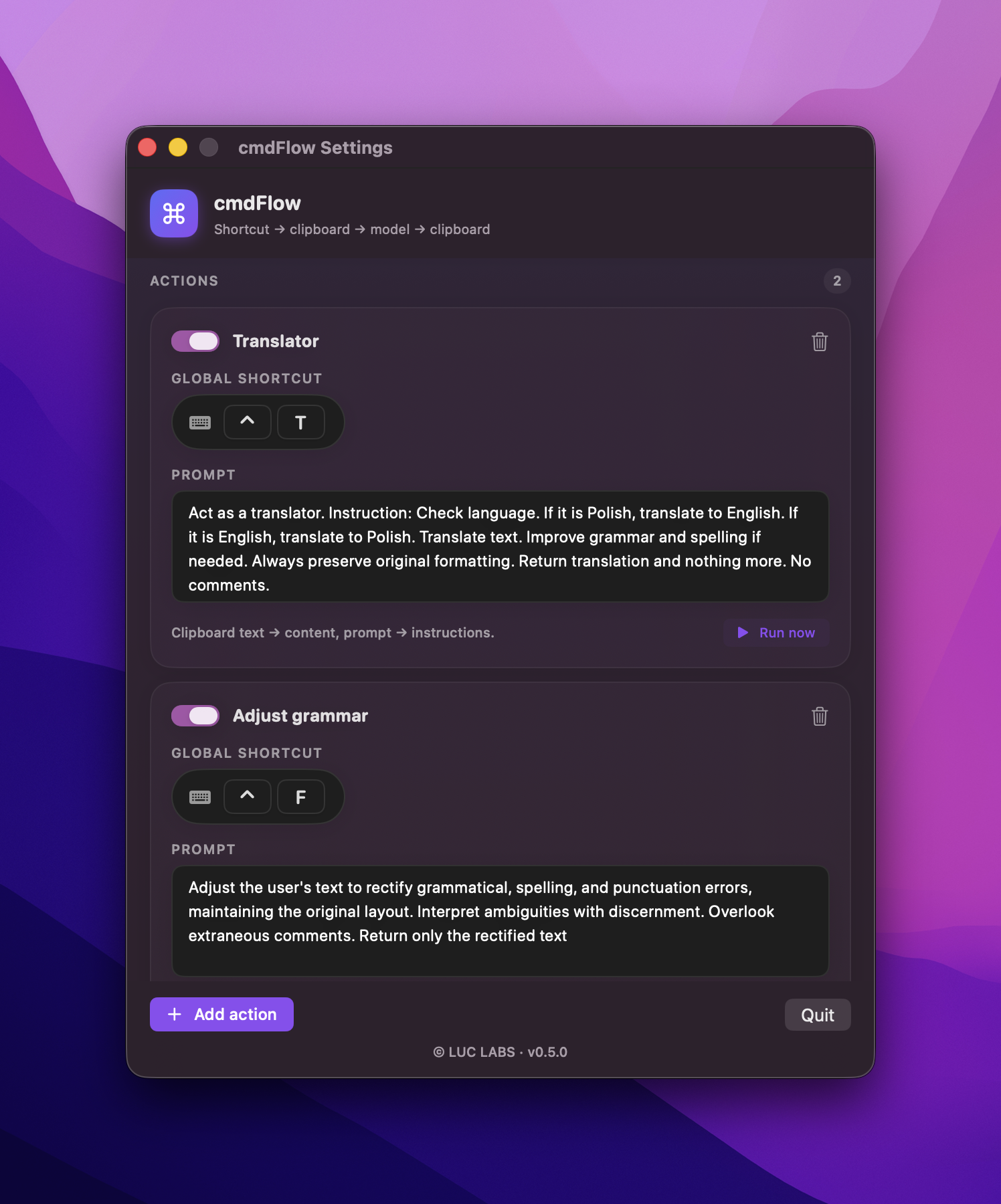
Global shortcuts
Trigger from anywhere. No window, no context switch.
Your prompts, your actions
As many actions as you want — each on its own key.
Screenshot chat
Snap any region and chat with a vision model about it — streamed, multi-turn.
On-device & private
Apple Intelligence, locally. Your text never leaves your Mac.
Bring your own cloud
Optional OpenRouter or OpenAI with your key — any model, any language.
Web search
Let cloud models browse the web for current info. On by default.
Model search
Pick from hundreds of models with a built-in, searchable picker.
Launch at login
Set once, always ready. Quietly in the menu bar.
Free & open source
MIT. Inspect it, fork it, ship your own.
Screenshot chat
Not just text — cmdFlow can see
Snap any part of your screen and talk to a vision model about it. Menus, charts, a product, an error — just ask.
Select any region
Drag over anything on screen. Everything dims, your selection stays lit — Apple-style.
Ask right there
A focused input pops up on the spot. Type your question and hit enter.
Streamed, multi-turn
A floating chat streams the answer word by word. Keep asking — the image stays in context.
It looks like focaccia topped with green olives and rosemary — a classic Italian flatbread. Want a gluten-free version?
Backend
On-device by default. Cloud when you need it.
cmdFlow uses Apple's Foundation Model right on your Mac — no account, no key, nothing sent anywhere. Need a language the on-device model doesn't cover, or a specific model? Switch to OpenRouter with your own key, or let cmdFlow fall back to it automatically.
- Private
- Free
- Offline
- Any model
- Any language
- Your key
Use cases
Copy in. Better out.
Wire up an action for each thing you do all day. Here are a few to start.
je suis en retard
I'm running late.
i has finish the task yesterday
I finished the task yesterday.
A long paragraph of meeting notes and context…
One clear line.
hey can u send that over whenever
Could you please send that at your convenience?
the thing is basically kind of not really working
It isn't working as expected.
Anything you can describe.
Exactly what you asked for.
Shortcut recorder
Set a shortcut in a tap.
cmdFlow listens for your combo — with a live radar animation — and warns you if it clashes with a system shortcut.
No clashes with system shortcuts
Requirements & install
Up and running in a minute
Requirements
macOS 26 (Tahoe) or later, Apple Silicon.
Apple Intelligence
Enable Apple Intelligence for the on-device backend.
Install
Download the DMG, drag cmdFlow to Applications.
First launch
Right-click → Open — the app is unsigned (open source, no Apple Developer account).
Gatekeeper complaining? Clear the quarantine flag:
$xattr -dr com.apple.quarantine /Applications/cmdFlow.appFAQ
Questions, answered
Yes — free and open source (MIT). The on-device model costs nothing. OpenRouter and OpenAI usage is billed by them on your own key.
Yes. Hit the screenshot shortcut, drag over any region, and a floating chat opens — ask a vision model about menus, charts, a product, an error. Answers stream in and stay multi-turn, saved in a Chats tab.
Cloud models (OpenRouter and OpenAI) can browse the web for current info, on by default. The on-device Apple model stays fully offline.
With the on-device backend, nothing leaves your Mac. OpenRouter and OpenAI modes send your text — and any screenshot you capture — to that provider.
The on-device Apple model supports English, German, French, Spanish, Italian, Portuguese, Japanese, Korean, and Chinese. For anything else — including Polish — use OpenRouter or OpenAI.
cmdFlow isn’t code-signed yet. Right-click → Open on first launch, or run the xattr command above.
No. Global shortcuts use Carbon hotkeys — no Accessibility prompt.